One system that does the work. On anything you hand it, around the clock.

Describe what you want built, hand over something you run, or ask for a job done. Xovris works out what it is from the thing itself, does it, and stays on it – and each thing you hand it gives it more to follow a fault through.

See it follow a stopped controller across 11 records from 2 sources

Auto
More: what Xovris does with it, planning first, an idea or an import
What Xovris does with it
Enter to send · Shift+Enter for a new line

Start freeTry the sandbox

Xovris at workReplaying work Xovris has done

Noticed by Xovris

POST /total started failing – TypeError: Cannot read properties of undefined (reading 'valueOf')

  1. Traced it to lib/total.js, line 5
  2. Found the change that caused it: “Read the quantity straight from the order line (#212)”
  3. Ran the failing request on that change and on the one before, to be sure
  4. Took back what that change did in lib/total.js
  5. Opened a pull request with the fix

POST /total answers again

· 43 s start to finish

lib/total.js
4- const qty = item.qty;
4+ const qty = item.quantity;

Asked

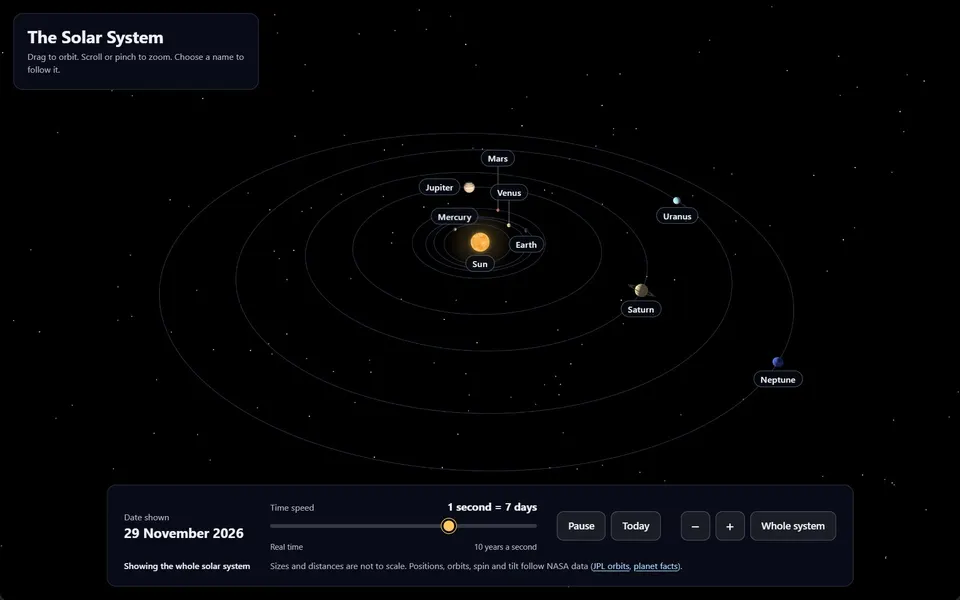
“A 3D solar system I can orbit and zoom with the mouse, with each planet labelled and a slider for how fast time runs”

  1. Wrote it – 4 files, 66 KB
  2. Drew it in 3D, right in the browser
  3. Running, exactly as it came out

Live – use it, or keep building it

Asked

“A booking page for my hair salon with prices, opening hours and a contact form”

  1. Built in 27.6 s
  2. Then asked“Make it feel more luxurious - a deep charcoal background with warm gold accents - and add a gallery of my work”
  3. Changed in 17 s – the same page, carried on
  4. Then asked“Let people choose a stylist and a time slot when they book”
  5. Changed in 40.6 s – the same page, carried on

One page, carried on from each message to the next

  1. The page as it stood at 00:31:03 UTCAt 00:31:03 UTC
  2. The page as it stood at 00:31:20 UTCAt 00:31:20 UTC
  3. The page as it stood at 00:32:01 UTCAt 00:32:01 UTC
Keep building it

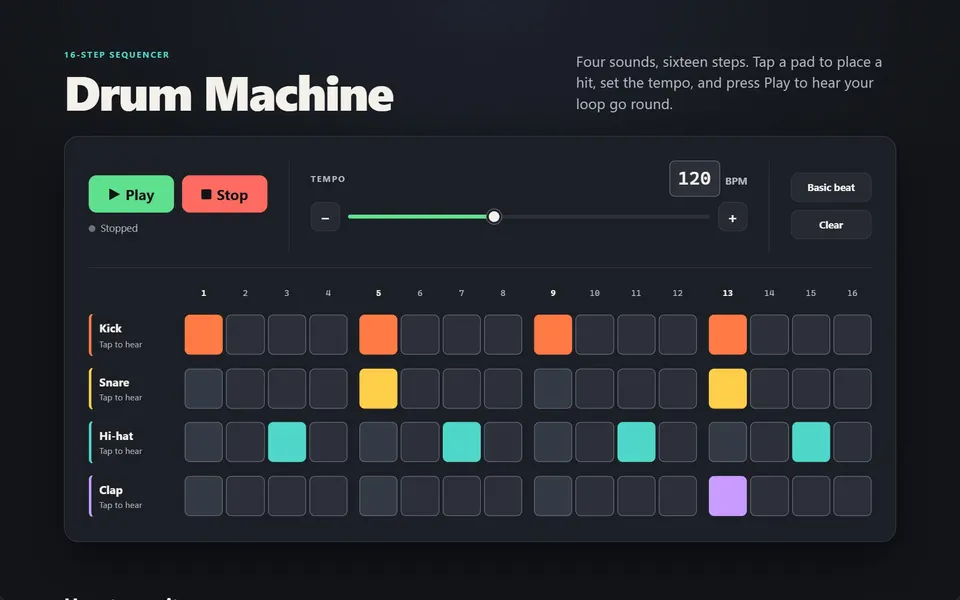
Asked

“A drum machine with a 16-step grid, kick, snare, hi-hat and clap sounds, tempo control, and play and stop”

  1. Wrote it – 5 files, 43 KB
  2. Running, exactly as it came out

Live – use it, or keep building it

Noticed by Xovris

greenhouse-controller stopped working

  1. Read 11 records from 2 sources
  2. Found the cause: greenhouse-controller's firmware channel changed from stable to nightly at 01:48 UTC, 12 minutes before greenhouse-controller first failed
  3. Put greenhouse-controller back to stable, its last good setting

greenhouse-controller is back on its last good setting

greenhouse-controller · firmware channel

stable

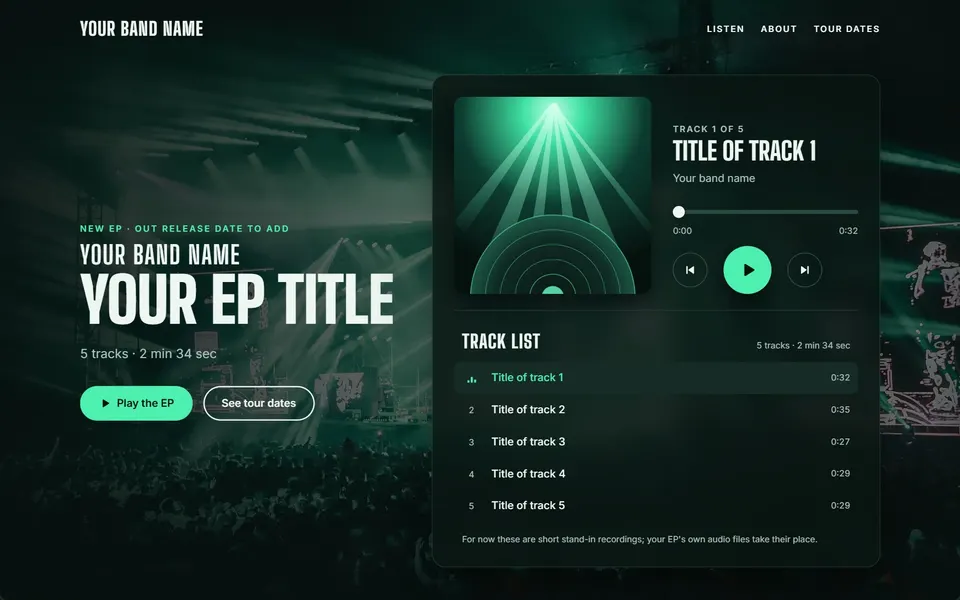
Asked

“A music player page for a band's new EP with track list, play and pause, a progress bar and tour dates”

  1. Wrote it – 16 files, 3,450 KB
  2. Running, exactly as it came out

Live – use it, or keep building it

Asked

“Start the network map from our NetBox”

  1. Read NetBox 4.7.3: 2 devices with their sites and cables
  2. Matched 1 of them to a device Xovris reads itself
  3. Marked 2 that differ from what is really there

The map stands, and what differs is marked on it

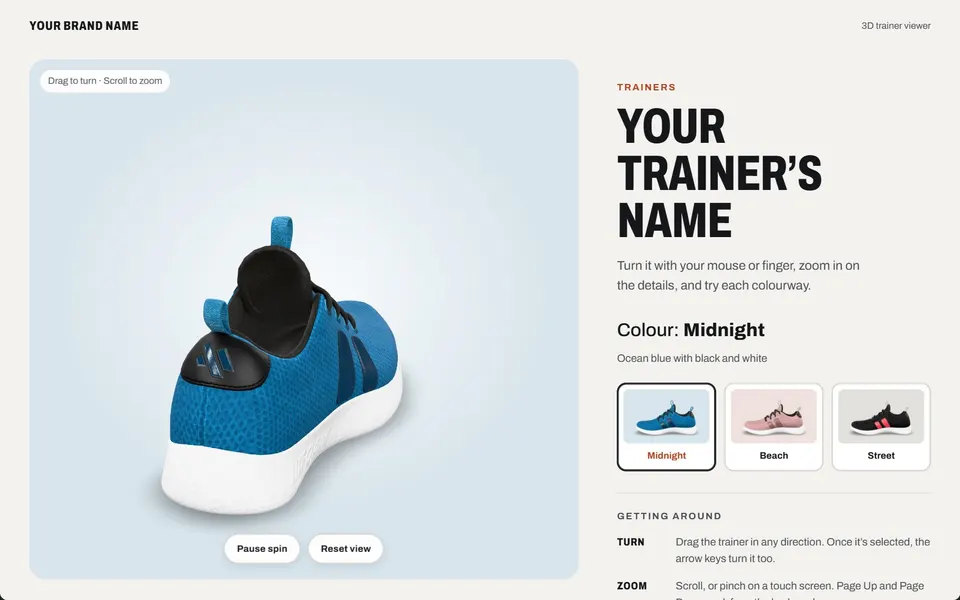
Asked

“A 3D spinning product viewer for a pair of trainers that I can rotate with the mouse, with colour options”

  1. Wrote it – 8 files, 7,729 KB
  2. Drew it in 3D, right in the browser
  3. Running, exactly as it came out

Live – use it, or keep building it

Noticed by Xovris

A switch’s link to its router went down

  1. Read the switch and its router – 17 reads in 73 s
  2. Found it: port 1 was shut by the switch’s own loop protection, a second cable closing a loop
  3. Said which cable to pull, then turned the port back on the moment the loop was gone

The link is back up and the router answers again

Port 1 – the link to the router

ShutBack on

Asked

“Look over this firewall’s set-up”

  1. Read its whole set-up through its own sign-in, changing nothing
  2. Found 3 things to tighten
  3. Tightened 1 thing and read each change back

Safer than it was, each change read back

Noticed by Xovris

Is xovris.ai answering for everyone?

  1. Asked it from every place Xovris checks from, at once
  2. 95 ms from South Africa up to 365 ms from United States

Answering everywhere

Read while this page was built

Noticed by Xovris

api.xovris.ai outgrew the database server it shared

  1. Found the cause: connections held open on a shared database server
  2. Moved the database onto a dedicated core of its own

Put right on 23 October – answering in 10–74 ms since

Noticed by Xovris

Something new joined the network at 192.168.1.30

  1. Looked over the whole network – 7 devices answered
  2. Named it HP LaserJet Pro M404: it answers a print service (ports 80, 631, 9100)

HP LaserJet Pro M404 is on the map with everything else

  • Router
  • Dell
  • 192.168.1.21
  • Synology DiskStation
  • Philips hue - bridge
  • Network Camera
  • HP LaserJet Pro M404

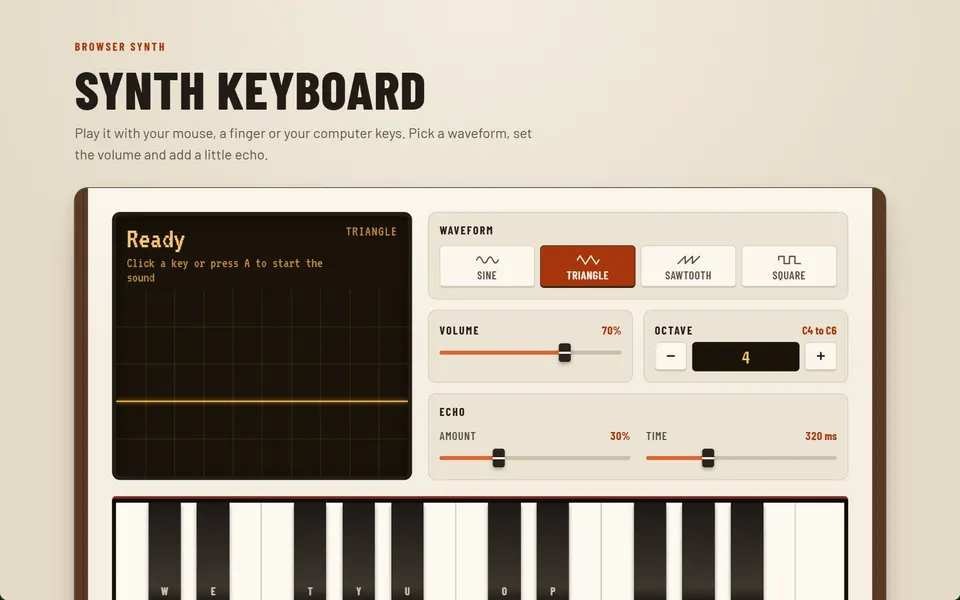
Asked

“A synth keyboard I can play with the mouse or my computer keys, with a choice of waveform, volume and a little echo”

  1. Wrote it – 4 files, 55 KB
  2. Running, exactly as it came out

Live – use it, or keep building it

Asked

“npx xovris init”

  1. Found Next.js, using npm.
  2. Signed in to acme
  3. Created an ingestion-only key
  4. Wrote 5 changes; each is listed in .xovris/manifest.json
  5. Xovris received the test event
  6. Telemetry received – your first event is in Xovris

Xovris is installed. Remove it any time with npx xovris remove.

$ npx xovris init
✓ install @xovris/next with npm
✓ create instrumentation.ts
✓ create instrumentation-client.ts
✓ create app/xovris/route.ts
✓ set XOVRIS_INGEST_URL, XOVRIS_INGEST_KEY, NEXT_PUBLIC_XOVRIS_INGEST_URL, NEXT_PUBLIC_XOVRIS_INGEST_KEY, NEXT_PUBLIC_XOVRIS_TUNNEL in .env.local

Asked

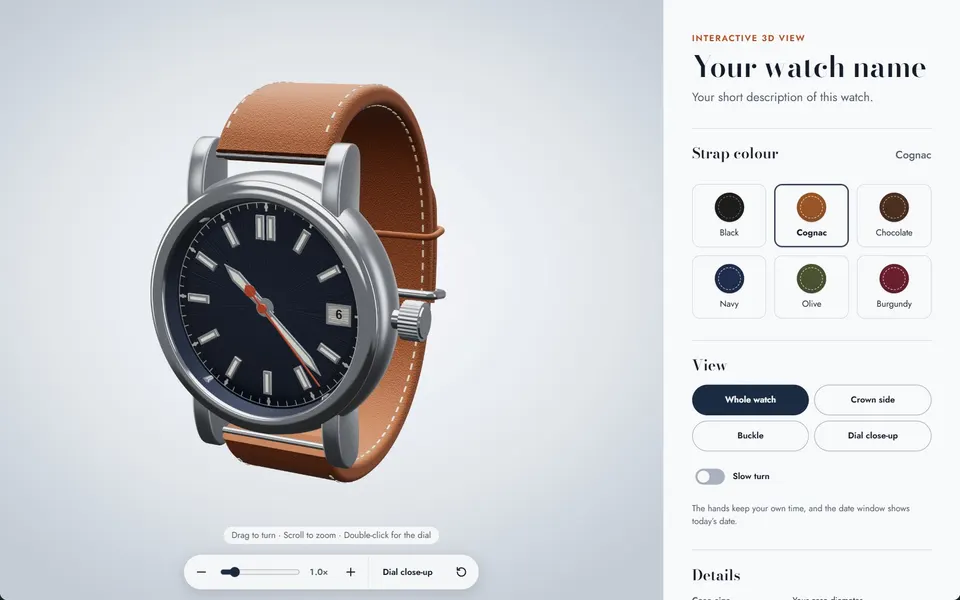
“A 3D viewer for a wristwatch I can rotate and zoom, with strap colour options and a close-up of the dial”

  1. Wrote it – 5 files, 76 KB
  2. Drew it in 3D, right in the browser
  3. Running, exactly as it came out

Live – use it, or keep building it

11 finexovris.ai

What Xovris found when it read xovris.ai

xovris.ai is served from Cloudflare, Inc., keeps its DNS on Cloudflare and keeps its email on Microsoft 365. Everything Xovris could read on xovris.ai answers as it should – none of 11 readings is wrong.

Found from the site itself, the last time Xovris read it

What Xovris has found for people so far – each one an example, never the edge.

  • Websites

    Xovris checks your address, HTTPS answer, certificate and pages from outside, the way a visitor reaches you, and tells you in plain words what changed and what to do.

  • Apps

    One command connects your app. Xovris groups each error into one issue, ties it to the release that shipped it and keeps the stack trace readable.

  • Domains and DNS

    Xovris keeps a checked copy of your domain’s records, watches its registration and certificates, and puts back a record that changed – as far as you allow – then checks it again.

  • Email

    Xovris reads the records that say who may send email as you (SPF and DMARC) and tells you, in plain words, whether forged email from your domain is stopped or delivered.

  • Security

    Xovris watches the public signals an attacker leaves on your domain – certificates issued for your names, the signing that protects your domain’s address book (DNSSEC) breaking, certificate rules that change – reads your Cyber Essentials readiness from your real computers and accounts, and tells you which ones need you.

  • Networks

    See how your home or office connection reaches the internet – online, IPv4 or IPv6, the encryption on the way and the nearest edge – measured in your browser, now.

  • Devices

    See how the device you are reading this on stands – its browser, a secure connection, passkeys and its privacy signal – checked in your browser, with nothing sent anywhere.

  • Cloud

    See who hosts any website, whether a delivery network stands in front of it and who runs its DNS – read from public records in your browser, now. Vercel projects connect to Xovris today.

Watched from everywhere, all the time.

Xovris checks what you run from many places at once, so it sees a fault where your customers are, before they do. This is xovris.ai, as Xovris last read it.

Answering from everywhere Xovris checksAnswered first 95 msSlowest 365 msRead 18 November 2026 23:05:29 UTC
  • Germany328 ms
  • United States365 ms
  • Brazil245 ms
  • Japan124 ms
  • Australia195 ms
  • South Africa95 ms

Show Xovris anything you run

An address is read here, in your own browser, and nothing of it is kept. Anything else opens the Ask, which says how Xovris will look after it.

Three ways in

Each path ends with Xovris watching what you connected

Everything with a network. Looked after on its own.

Every device on your network, whatever its make: Xovris learns each one, keeps it up to date and fixes it when it breaks.

Learn more
SD-WAN edgeFirewall AFirewall BRemote accessServersCore switchStorageUPSAccess switchWi-FiAccess switchLaptopsPhonesPrintersCamerasBuilding systemsSD-WAN edgeFirewall AFirewall BRemote accessServersCore switchStorageUPSAccess switchWi-FiAccess switchLaptopsPhonesPrintersCamerasBuilding systems

And the everyday work of an IT team, done on its own

The strongest features, what fixes things first.

The features that do the most for you come first: what fixes and prevents problems, then what finds their cause. Every one is listed in full, with nothing held back.

Every feature

Keep the tools your team already uses.

Each one joins in one step and keeps working as it does today. Xovris reads from it and writes back to it.

Every integration
  • OpenTelemetryAdds Xovris as a second OpenTelemetry exporter – your existing setup keeps working unchanged.
  • SentryOffers to run both side by side for a while, or to switch over; it never sends one error to Xovris twice.
  • DatadogLeaves the existing agent in place and offers to export through OpenTelemetry instead of adding a second agent.
  • New RelicLeaves the existing agent in place and offers to export through OpenTelemetry instead of adding a second agent.

Three things to know before you start

What will Xovris change on my systems?

Whatever you allow it to fix. Watching needs no access at all. Each connection you grant extends what Xovris can fix, and every fix stays inside what you granted: the exact change you approved, with its undo written down first.

Every permission, scope by scope
What does it cost me?

Watching is free: 50 monitors, for good. Personal adds fixing: Xovris puts problems right for £55.99 a month, and an issue counts only once it works again.Watching is free: 50 monitors, for good. Personal adds fixing: Xovris puts problems right for €65.99 a month, and an issue counts only once it works again.Watching is free: 50 monitors, for good. Personal adds fixing: Xovris puts problems right for US$74.99 a month, and an issue counts only once it works again.

Pricing, in full
How do I undo it?

Everything setup changes is recorded, and one command reverses all of it and revokes the key.

How removal works

Start free

Words on this page, in plain English

Each technical word this page uses, said simply.

Plain-text data (JSON)
A common way of writing data as named values, readable by people and programs alike.
Data an app reports about itself (telemetry)
The errors, timings and records an app sends out so problems can be spotted and explained.
Domain Name System (DNS)
The internet’s address book: it turns a name you type into the number of the computer that answers for it.
Secure web connection (HTTPS)
The encrypted way a browser and a website talk, so nobody on the way can read or change what passes – the padlock in a browser.
A message sent to your own system (webhook, webhooks)
An automatic message one service sends to an address you choose the moment something happens.
The open standard for app data (OpenTelemetry)
A free, widely used standard for collecting an app’s errors, timings and records and sending them to any monitoring service.

Ask Xovris

Open the full page