Tell it what you need. It does the work, and keeps doing it.
Build something, hand over something you run, or ask for a job done – in your own words. Xovris does it on its own, keeps it working day and night, and tells you what it did.
Found the cause: greenhouse-controller's firmware channel changed from stable to nightly at 01:48 UTC, 12 minutes before greenhouse-controller first failed
Put greenhouse-controller back to stable, its last good setting
greenhouse-controller is back on its last good setting
greenhouse-controller · firmware channel
stable
Asked
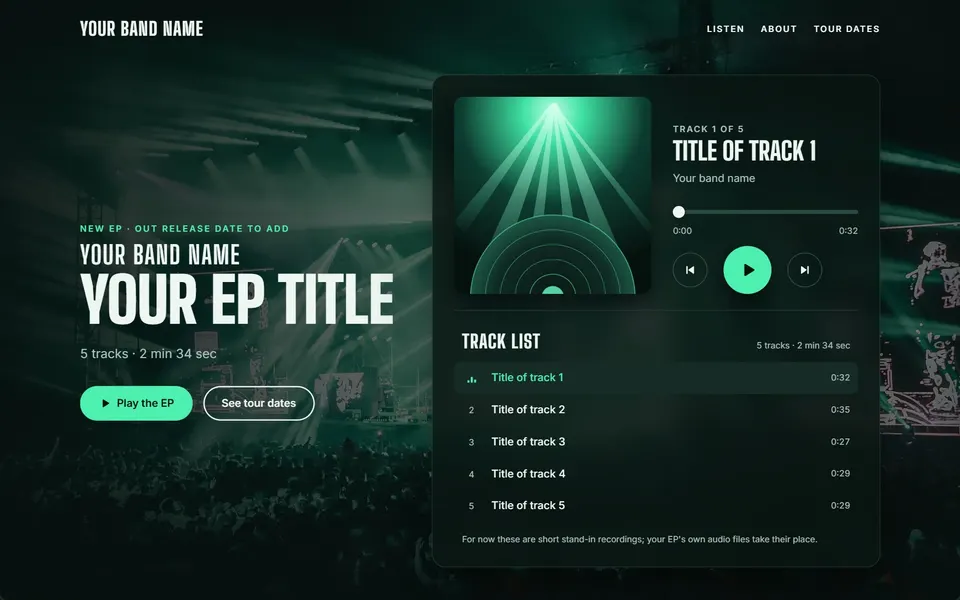
“A music player page for a band's new EP with track list, play and pause, a progress bar and tour dates”
What you getis the fix, never a dashboard to watch.
Xovris does the looking after, and tells you what it did.
It notices first
When something starts to go wrong, Xovris has seen it before the people who rely on it do.
It puts it right
It makes the fix itself, as far as you allow, and anything it changes can be put back in one press.
It shows you
Every job comes with a plain account of what it did, in words you can forward.
Wi-FiWi-FiSwitches
LaptopsLaptopsFirewall
PhonesPrinterServers
PrinterFirewallAccess points
CamerasEmailAccounts
Smart TVCloudCloud
EmailCodeNAS
AccountsPaymentsCode
northmerefreight.com
Everything you run, round the window: these are examples, never the edge - anything with a network is looked after the same way
Workspace
Home
Inbox1
Ask Xovris
Activity
Connections
shop.northmerefreight.comXovris’s own system
northmerefreight.comXovris’s own system
Office network
10 devices
What was asked
northmerefreight.com/checkout is downNo place can reach it.
“Keep the checkout on northmerefreight.com working”
BrokenFixingFixednorthmerefreight.com/checkout
northmerefreight.com is unreachable at /checkout
Activity
Xovris opened the incident: no place reaches /checkout
Xovris found what changed
Xovris put it right on its own
Every place reaches /checkout again
“A booking page for my hair salon with prices, opening hours and a contact form”
Booking – My Hair Salon
Prices
Opening Hours
Book an Appointment
“Look after my Next.js app”
$ npx xovris init
Found Next.js, using npm.
Signed in to acme
Created an ingestion-only key
5 changes in ~/acme-web
Wrote 5 changes; each is listed in .xovris/manifest.json
Xovris received the test event
Telemetry received – your first event is in Xovris
Connected with one line on 15 November 2026 – a sample appConnect yours →
Answering from every place in 95 ms to 365 ms – read 18 November 2026 23:05:29 UTC
XovrisWorkingWorkingWorked for 1.52 s
What Xovris did
On it – reading how /checkout answers from each place, and its records
The causeDNS
northmerefreight.com now points to 198.51.100.66, changed 5 minutes ago
Put right on its ownRehearsal
Started the page: Booking – My Hair Salon
Built Prices
Built Opening Hours
Built Book an Appointment
Checked it: accessibility 100, best practices 100, performance 100 – no failed request, console error or spill at any width
Kept it, ready to change by talking to it - its history starts here
Found Next.js, using npm.
Signed in to acme
Created an ingestion-only key
5 changes in ~/acme-web
Wrote 5 changes; each is listed in .xovris/manifest.json
Xovris received the test event
Telemetry received – your first event is in Xovris
Read it from every place at once: Germany, United States, Brazil, Japan, Australia and South Africa
Reads it again all the time, and tells you the moment a place stops reaching it
Xovris
Fixed on its own: /checkout
northmerefreight.com is working again from every place.
On your phone
#website
Xovris
Put /checkout on northmerefreight.com right on its own – it is working again.
In your team’s chat
Jobs done by Xovris: a page from the builder, an app connected with one command, and a site put right on its own.
You choose how far Xovris goesand nothing goes further.
Turn it to see what Xovris does at each level. One switch in your settings stops every change at once.
Fix with approval
Your own setting, for when you want to see each change: on the connection the incident is on, Xovris gets the exact change ready – a pull request, an environment setting, a DNS record – makes it the moment you press ‘Yes’ and proves it. One ‘Yes’ covers one change.
Everything it looks after,working today
Every capability built and working now, in its group - each opens the page that shows it in full.
Every capability here is built and working today, each in its group.
Xovris does it for you
Tell Xovris what you use and what you want done. It does the work and stops only for your yes – and doing it yourself always stays one press away.
Your data is never used to train our AI. Your systems, files, logs and settings stay yours: they are never used to train any AI, ours or anyone else’s, and nothing of yours ever reaches another customer. What Xovris remembers about your setup is yours to see, correct, pause and delete.
 At 00:31:03 UTC
 At 00:31:20 UTC